Hello all, first off, I’m very new to MNodes (as I’m sure this post shows) but not new to the idea of modular building, having had a Nord Modular years ago and quite a bit of experience with Max/MSP (albeit 25 years ago)
I have jumped in today and managed to build something that I’ve wanted as a plugin for a while now but I really need to reduce the range of some parameters and then control with a knob on the front panel.
What’s the easiest way to set a min/max for a parameter and have the knob limited to that particular range?
Secondly, is there a way to display the graph view of multiple filters in a single view?
My project requires 5+ filters with control over just 1, but I’d still like visual feedback for the other filters that you can’t control. Is that possible?
Many thanks in advance and I look forward to contributing to the community once I’m more comfortable in MNodes.
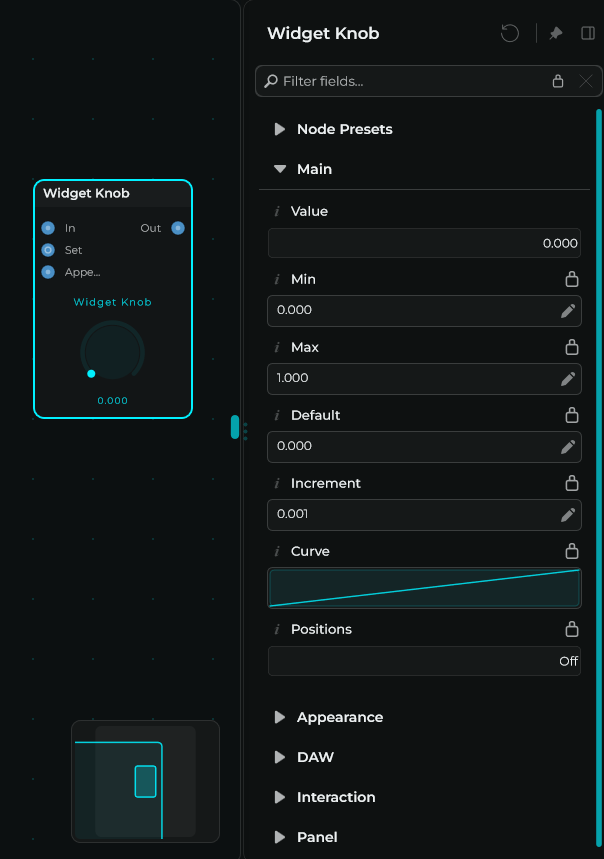
The Inspector panel is the place to set the min/max for the knobs. Right-click on the Widget Knob and select Show In Inspector. The min/max/default/curve params are there, along with params to control the knob appearance on the front panel:
For the Filters, if I am understanding your question correctly, right-click on the filter node and select “Add to Front Panel”. Then bring up the front panel (Alt-Ctrl-P or via the View menu) to adjust size and position of the filter views. Use the Inspector panel for the filter nodes to adjust appearance (labels, color, etc).
For the filters, if you were wanting all 5 curves in the same rectangular view, then it might work to add all the filters to the front panel, make them all the same size, and move them all on top of each other. Then adjust transparency (alpha) so that all the curves are visible and use the layers tool to make sure the one filter that is interactive is at the top of the layer stack (or use the Move to Front in the right-click menu on the filter view).
Thats so much for the replies @tonecarver
I had thought that layering the filters on top of each other might work once I spotted the alpha channel option.
I’m only a few hours in so far but I’m loving it so far and seeing a lot of potential!
I had assumed there would be some kind of inspector panel but I guess it works a bit differently to how I imagined. I had tried a few ways to get at it earlier and for some reason was hitting walls.
I even worked through the tutorials but I guess I need some time with the manual too.