The node selector is one of the most important tools to use in MNodes - everyday!
I mean this thing:
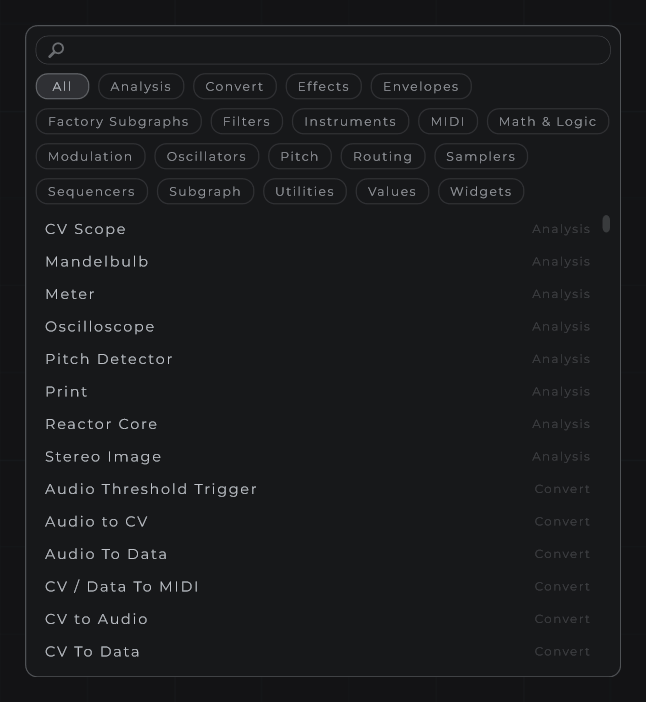
It is quite nice already but there are some things missing that would make working with it even more elegant.
(1) User categories: Add you own categories (aka “favorites”)
Using a [+] button you should be able to add you own category buttons.
E.g. “Reverbs”. You should be able to add any node, module or plugin to such a user category. We do need a separate editor for that so that you can add, change, re-order and remove elements from a user category. A dedicated window that allows comfortable editing shall be provided.
(2) (Optional) “Plugins” category - showing all 3rd party plugins (VST)
There shall be a option to allow a auto-category “Plugins” that contains all plugins. When this category is visible then you can click on it and see all plugins. Adding a plugin automatically adds a PluginHost with this plugin.
To support this (3) should be done as it helps a lot!
When shown - plugins are searched, too!
(3) Category editor
In order to be able to unclutter the node selector a category editor would be neat. This dedicated window allows to hide categories, add user categories (see (1)) and re-order the categories.
The optional category “Plugins” would be hidden by default but could be enabled here. Hidden categories would NOT be searched when typing text.
When some categories are hidden this must be somehow displayed in the overall node selector so that the user quickly realizes that some categories are hidden and COULD be shown. Maybe another category “Hidden” could be added for this purpose that only contains the hidden category items.
(4) Category context menu
CLicking on any category should display a menu will all options what you can do with this category. Should work in the node selector itself and the category editor and everywhere categories are shown. Options could be
“Hide”,
“Show”,
“Remove” (only for user categories)…
(5) Node context menu
Also nodes in the node selector should be right-clickable. Menu content e.g. “Pin” (node is in a separate “pinned” group at the very top of the category, add a “pinned” icon before it then)
“Add to…” (add node to user category)
“Create” (add to graph)
(6) “Recent” node section
Recent used nodes (or plugins) shall be displayed in a auto category “Recent” (or added to the top of the node selector, dunno).
Up to 7-10 elements could be added this way to have access to the recently used nodes / plugins. This can speed up things. Also you could “later” add such elements to one of your custom categories because you can easily find them there.
Hope you like the ideas 