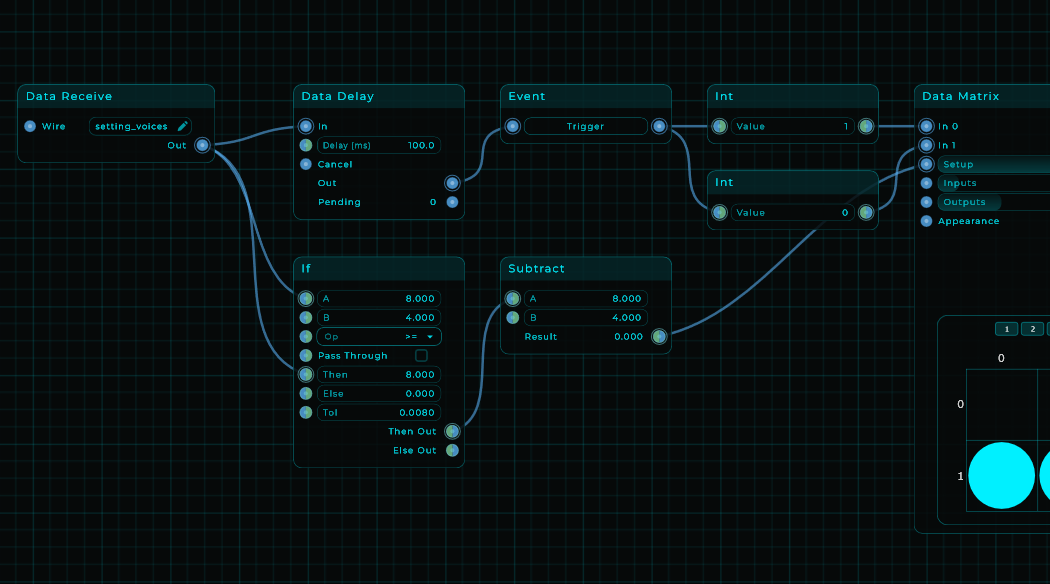
Seeing some strange behaviors with Data Matrix (v1.1.0 and 1.1.1). Please let me know if I am doing something wrong here ..
Data Matrix seems to forget the ‘in 1’ value after passing values through. Also, the ‘in 1’ value changed to the value used to set a field in a different node that was not connected to the ‘in 1’ pin. The video shows a patch with a simple incrementing number flow starting at 0 and wrapping when value gets greater then some limit. From 0:00 to 0:10 the value increments but then gets stuck at 4 which is greater then the limit (3). From 0:11 to 0:20 the limit is changed in the Greater Than node to 7 and the value gets stuck at 8. In both cases the ‘in 1’ value became the limit + 1 but should have been the 0 value initially pumped into ‘in 1’. Re-pumping the 0 value into ‘in 1’ causes Data Matrix output to become 0.
TL; DR: Changing the value in the Greater Than node alters the values used by the Data Matrix.
Wait … is this a timing/propagation thing? The in0 value (which is 1 over the limit) shows up at the in0 port while the state is 0 (out = in0) then the path through the greater then is 1 node longer so the state transition from 0 to 1 appears AFTER the the in0 value arrived.
That makes sense .. but makes it difficult to get the timing right when doing maths and logic to select alternate paths.
What is the proper way to architect this? Add Pass nodes to make all paths equal length? Is the downstream node (Data Matrix in this case) supposed to wait until all ports get values before processing inputs?
Now i didn’t go in depth with your example, was already trying to write about this but thought, lets first boot up my windows with MNode so i can show it instead of explaining it. i think you will see what i did to adjust for the timing:
Yes, i had a strange issue with this. because with a widget knob selecting a value, all worked fine but double clicking on it which would send its default value didn’t work. then i figure out that it could work sometimes but it all depended on a timing. I don’t know if this would be normal behavior but then, this little trick worked.
Hmmm .. perhaps a WaitFor node would be useful to capture that architectural pattern. Takes a user selectable number of input pins (with automatically matched output pins) and the number of milliseconds to delay. At delay expiration, trigger all inputs to flow to their respective outputs. Or, instead of a formal node, a set of subgraphs with differing pin counts would suffice.