What it’s all about is that for the community, and for me as i am a very motivated MNode user that invest time to create projects(presets) i considered to create some tools. Even me, i can handle some work with Blender 3D but it does take time while a lot of visual elements can be created with online tools with less effort.
So i created seven tools:
I hope it helps out the community and if there any feature request that you consider is missing or good be a use full tool, just let me know.
Have fun!
PS: I am not promoting my website, but i am using social image links and they are a bit in your face with all those “DARC SECTOR”. I am still developing/fine tuning my own CMS.
These look great!! What are the license stipulations, if any, around use of assets generated using these tools. I want to be sure I don’t violate any rules. Thanks!
Sure, I hope i got that covered on my website. Even as a non commercial (hobby) website i even follow the Dutch law about the data protection so there is also a privacy link (on the bottom of the website as the licenses section.)
I also added a link to the terms at the header of every tool.
Well a few more new tools i am playing with and they are available online, they work. at least i didn’t tested out every single design but it will always be about tweaking the right size, color and so. until now i didn’t came across a mismatch in design & download.
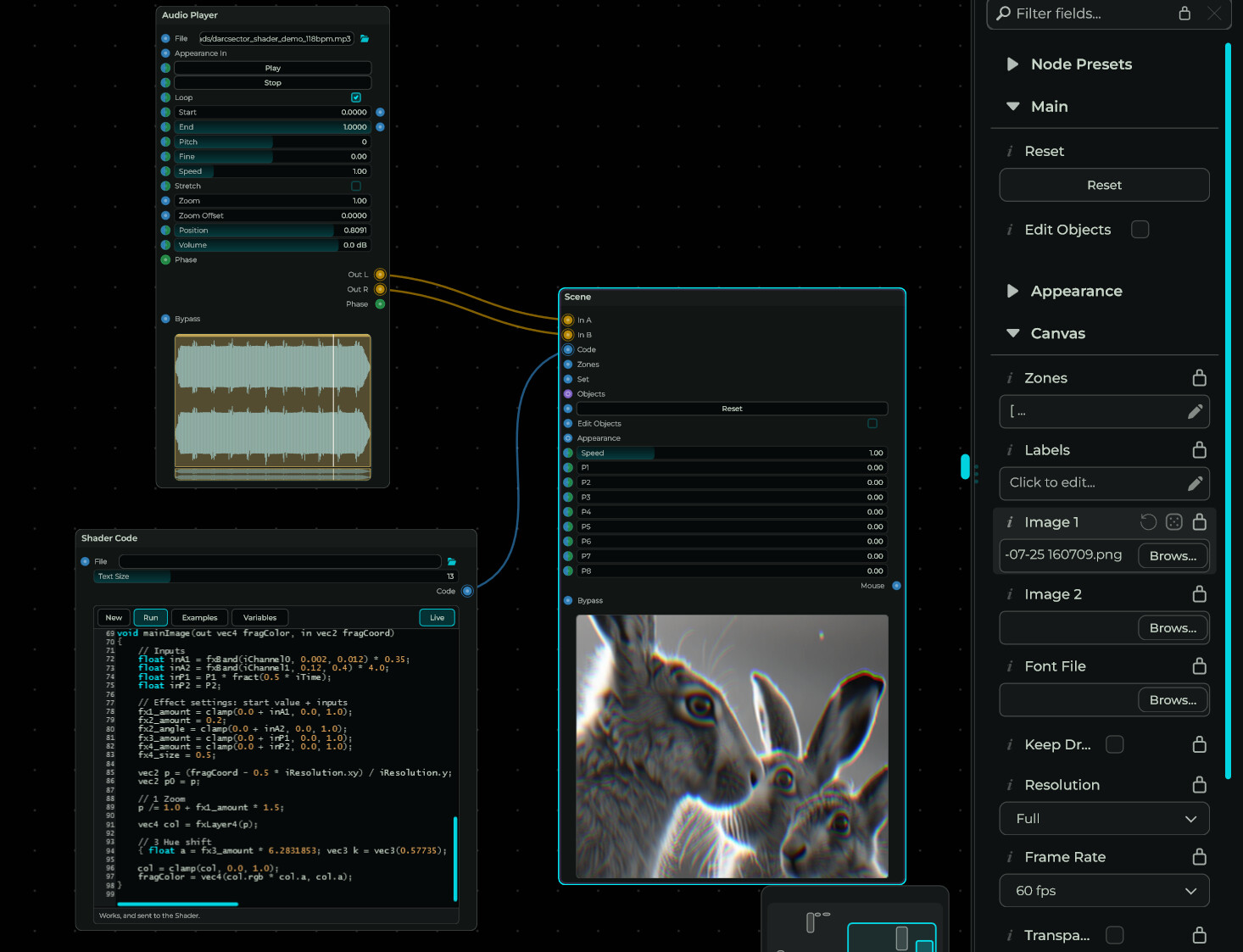
You don’t need to upload a picture, it will not be added into the shader cause that would be to much for shader code to run as a shader. It’s just to much data and the solution went into a system that creates a shader code with desired effect choices on the A (audio) P (parameter) sliders.
But you can, to visualize your idea in the tool itself.
After that, paste the shader code into a shader code node, connect that to the code input of the scene node. It will give a failure because it requires a image. While it will report an image error on 0 it actually means that you have to setup the (canvas / image 1) and add a picture. run the code again.
The visualizer has a few functions, well. enough but it of course can’t do it all but does some nice effects like zoom, rotate, glitches and more.
This is how you set it up and run an LFO->CV-2-Data node into the P sliders or just move them by hand to figure out whey are doing.
So here it is, at least i hope it works out for every situation. it’s my first version. In this tool you can copy the shader code, zone and labels and paste them in the corresponding sections (code for the shader code, zone & labels for the scene node)
More details and instructions are on the bottom of the tool.
It’s an early test release, i have been using it so it should work but for sure there can be a situation that might present an error. if so, just let me know.
Also if you are wondering where is a audio track player there, some of the knobs arc’s can respond to the audio signal. and there are some more options to set/unset to visualize parts of the knobs.