Haven’t run into needing to do this until now but how do you save a preset that has film strips, audio samples, and modules with film strips, images, samples such that when the user downloads and opens the preset, it contains all the files needed to make the preset work properly. I’m thinking if I just upload the preset file, all the supporting files will not be included and the preset will therefore not work properly when loaded by the user. Thanks.

its under save, on bottom
Ah - so that’s what that button is for  Thank you!!
Keep one thing in mind, Collect & export will not save the preset first and then collect all the data for export. It does what the functions is doing. collecting and exporting, not saving any changes you made before export to the preset file that’s gonna be exported.
Good to know - that’s important to understand. Thanks Danny.
nice work btw
ooooldschoool
Thanks - glad the export worked ok.
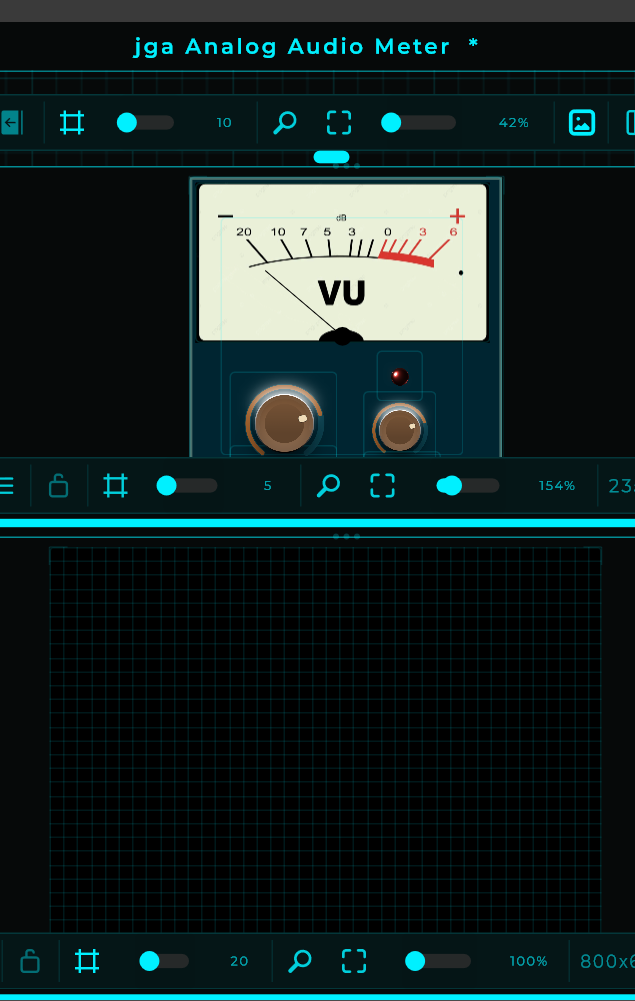
I found I had to include a gain control to help align the vu meter with what is reported by the MNodes meter. Almost like a calibration control. I don’t know if there is something in the dB to Linear node that causes me to have to include it or is it something I’m dong wrong in the math and translation from the audio to the Knob Widget used as the meter needle.
The meter only accepts one input so I was using the left channel of the Sampler Node as the source of the signal for demonstration purposes.
Since there is no current way to upload just a module to the Hub, ideally people should save the meter module as a module for use in their own presets. To use the meter in a Daw, you would need to build your own preset to view in edit mode. With two meters - one for each channel L and R.
If that’s confusing, I’ll create a preset with that meter module panel shown on the front preset panel that a person can just run as is in MNodes FX in perform mode.
I’ll take another look at it.
Let me know if you see any other strange funkiness about it. Thanks!!
well there is a stereo option now on the meter in 1.0.7
honnestly i thought it was a working gain meter and not a module
so i wondered where is the audio in then…
Please give it another go. Made the preset a perform mode preset. Also made it stereo - i.e., left and right channels - a meter for each. See if its still weird. Thanks.
i did but without sound i cant do sound right now ill try that in the morning
i cant find an obvious mistake tho and it is much more clear now
GT 0 ? is a bit strange and i dont understand the why but he i had to do some weird calculations on one of mine aswell to get things aligned especially with images and such
i think your good looks very nice btw the lighting on the knobs 
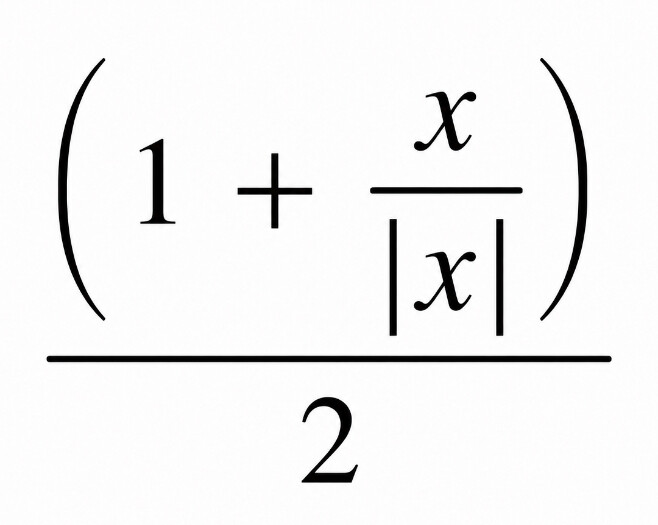
lol… “GT 0 ?” is a node i created for streaming data through. it determines if a value is greater than zero. when it is greater than 0, a 1 is output. when the input is less than zero, a 0 is output.
this makes the LED light up when the needle goes into the red above 0 dB (if you calibrate it that way)
formula is: