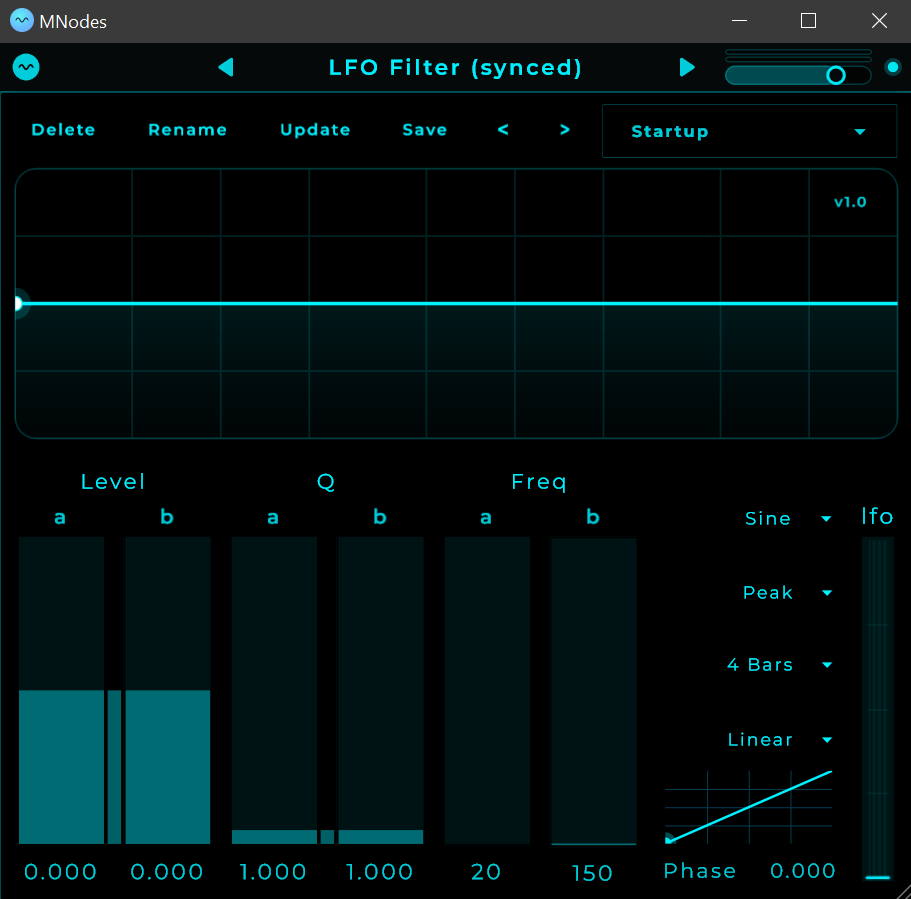
previously known as: time synched filter and long before that: time synched peak filter (you can delete those)
A filter synced to your daw. The idea is to set a min (a) and a max (b) for drive/level, q/res and hz (options depend on your filter) to travel between every lfo cycle from a to b to a.
v1.0 Features and need to knows:
- Relevant controls shown for each filter type.
- Double click on fader (phase included) to enter a value.
- Hover over any fader and then mousewheel to finetune.
- Mini faders in between shows you where you currenly are.
- Various curves to adjust the way hz travels like exponential, logaritmic, custom and more. (there is also a reset curve button, this button does not exist in linear and custom).
- Selecting a new filter resets drive/gain levels.
- Selecting a new curve also resets the curve (custom excluded).
- Copy from a to b or b to a with the a b buttons.
- Adjustable LFO phase.
- LFO travel display.
- Save your own presets.
- Hover over version nr for short help.
- Click on version number to go to the forum post for contact or comments.
(this post and thread have been cleaned up to not confuse anyone with pre v1.0 states)
Had a play with your project it works well …admire your creativity and ingenuity in implementation.
I tweaked a lot of parameters and I agree it seems ‘bug free’ - well done
Very minor thing, in the project name, I think “Synched” should be spelt Synced"
hey thnx for your feedback very much appreciated
i should have googled synced lol but i should find a better name anyway as i also want to make a free running version of this idea
cheers
there is a weird bug that puts the state of Q/Res b fader to res on just starting up, however this is purely visual and i can not find a reason for it to be there because the same logic is connected to its a fader and that looks just fine on startup
when i save having corrected it in fader b settings it does not stick and on next startup its showing res again not sure what is going on
when you switch filter everything is correct again
(fixed)
This looks like there may be something wrong in your patch, and the signal flow may not be executing in the correct order.
You should carefully check what is happening and whether everything is being initialized in the correct order. Basically, you’ll need to debug it. The trick is to isolate the problem.
If you can create a very simple patch where the bug can be reproduced, I can take a look at it.
sorry but the same trigger should also make fader a bug then i use only an event trigger no sending 1 or 0 but its ok i will work around it and swap out text instead of swapping labels
(fixed)
v1.0 is on the hub, i hope you like it all bugs have been worked out .
once MNodes v1.0 is out i will have another look at this to incorporate some recent changes
also i want to add a bypass that when bypassed can remain bypassed and then be used in combination with a midi trigger to open processing only when a trigger was found.
this would allow having it on sounds while only having it do something when a trigger was found, this opens the door for more that 1 way to use it
deleted from the hub for now it needs an update i dont have the time for now you can just aswell delete it it needs an overhaul after mnodes 1.0.1